


Page 7 - November Merged
P. 7
Feature | Stop using ChatGPT


          BEST CHATBOT FOR PROBLEM SOLVING & ADVICE


         We asked the five main AI assistants   Command Prompt or Terminal     It suggested which settings to focus on
         for help with three tech-related queries   Perplexity’s response was much   and to try a three-night test plan to
         home users may experience. We      briefer than the other AI tools, merely   identify the main cause.
         judged the level of detail in their   suggesting the registry tweak. It gave
         response; how easy their instructions   no reassurance that Microsoft was    PROMPT 3
         were to follow; and the accuracy and   fixing the problem, though it suggested   My HP printer is connected to my Wi-Fi,
         reliability of their information and   follow-up questions for further advice.   and I can see it under ‘Printers &
         advice.                                                               Scanners’ on my PC, but the status says
                                             PROMPT 2                          ‘Offline’. How can I fix this?
          PROMPT 1                          My Samsung Galaxy phone keeps losing
         I am trying to install the May 2026   20 percent of its battery power   ChatGPT suggested nine solutions to
         security update for Windows 11     overnight. How can I stop this     our printer problem to try in the order
         (KB5089549) and it keeps failing with   happening?                    presented, which even the AI tool
         the error 0x800f0922. What can I do?                                  admitted might be overkill (“the early
                                            ChatGPT said there were four possible   ones fix it most of the time”). As is
         ChatGPT briefly explained the reason   reasons for battery drain, including   standard for ChatGPT, each included
         for the problem, said our Windows   apps staying active in the background   step-by-step instructions and lots of
         install was “probably fine”, and   and the Always On Display setting. It   bullet points.
         suggested seven solutions, presented in   explained how to check and fix each of   Claude provided clear and concise
         the order we should try them. It offered   these, with links to relevant articles,   advice about fixing an offline printer.
         to walk us through the more technical   and asked which Samsung Galaxy   This was similar to ChatGPT’s, but
         steps, and drew on 18 different sources   model we own, as some have “known   didn’t include the advanced option to
         for its advice.                    battery-drain patterns with specific   disable SNMP (Simple Network
           Claude gave us a helpful answer   fixes”.                           Management Protocol) status
         explaining the reason for the error and   Claude told us: “This is a really   checking.
         reassured us it was a              common frustration!” and went        Copilot reassuringly told us: “this is
         “well-documented, Microsoft-       straight into the solutions. These were   one of the most fixable Windows/HP
         confirmed bug”, for which a permanent   similar to ChatGPT’s but with less   issues.” It outlined a step-by-step
         fix is coming. It suggested two    step-by-step guidance. Claude also   ‘workflow’ to solve the printer problem,
         potential solutions: installing the latest   advised installing the free app   made the titles of potential solutions
         update and performing a registry   AccuBattery to monitor battery health.   clickable so we could get further
         tweak, and provided step-by-step     Copilot’s advice was helpfully   instructions, and asked for more
         instructions.                      accompanied by screenshots showing   information to help diagnose the
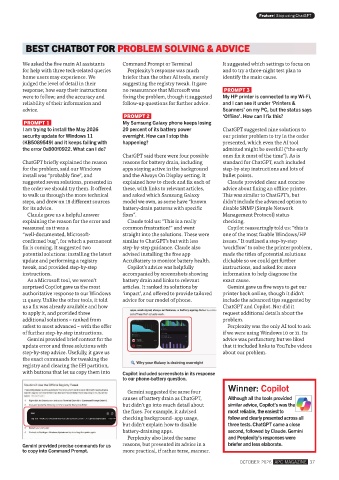
           As a Microsoft tool, we weren’t   battery drain and links to relevant   exact cause.
         surprised Copilot gave us the most   articles. It ranked its solutions by   Gemini gave us five ways to get our
         authoritative response to our Windows   ‘impact’, and offered to provide tailored   printer back online, though it didn’t
         11 query. Unlike the other tools, it told   advice for our model of phone.  include the advanced tips suggested by
         us a fix was already available and how                                ChatGPT and Copilot. Nor did it
         to apply it, and provided three                                       request additional details about the
         additional solutions – ranked from                                    problem.
         safest to most advanced – with the offer                                Perplexity was the only AI tool to ask
         of further step-by-step instructions.                                 if we were using Windows 10 or 11. Its
           Gemini provided brief context for the                               advice was perfunctory, but we liked
         update error and three solutions with                                 that it included links to YouTube videos
         step-by-step advice. Usefully, it gave us                             about our problem.
         the exact commands for tweaking the
         registry and clearing the EFI partition,
         with buttons that let us copy them into   Copilot included screenshots in its response
                                            to our phone-battery question.
                                                                                 Winner: Copilot
                                              Gemini suggested the same four
                                            causes of battery drain as ChatGPT,    Although all the tools provided
                                            but didn’t go into much detail about   similar advice, Copilot’s was the
                                            the fixes. For example, it advised   most reliable, the easiest to
                                            checking background- app usage,      follow and clearly presented across all
                                            but didn’t explain how to disable    three tests. ChatGPT came a close
                                            battery-draining apps.               second, followed by Claude. Gemini
                                              Perplexity also listed the same    and Perplexity’s responses were
         Gemini provided precise commands for us   reasons, but presented its advice in a   briefer and less elaborate.
         to copy into Command Prompt.       more practical, if rather terse, manner.
                                                                                     OCTOBER 2026  APC MAGAZINE  37

